To connect WordPress (or other tools) to your Pixxi listings, you need two pieces of information from Pixxi CRM: the full Data API URL for your company and a secret API token. Without both, the importer cannot talk to Pixxi’s servers or pull your properties. The sections below explain exactly what each value is and how it’s used.
What you’re looking for
- API Endpoint URL
A full base URL for the listings API, including your company segment at the end—not just the hostname.Example shape (spaces in the company name are URL-encoded, e.g.%20):https://dataapi.pixxicrm.ae/pixxiapi/v1/properties/Company Name So the pattern is:https://dataapi.pixxicrm.ae/pixxiapi/v1/properties/{Your Company Name As In CRM}The last part must match how your company/agency is identified for the Data API (often the same name you use in CRM, sometimes normalized—if in doubt, use exactly what Pixxi or their docs specify).
- API Token
A secret string the API expects (commonly sent as a header such asX-PIXXI-TOKEN). This is not your normal CRM login password.
Where to find the API token in Pixxi CRM
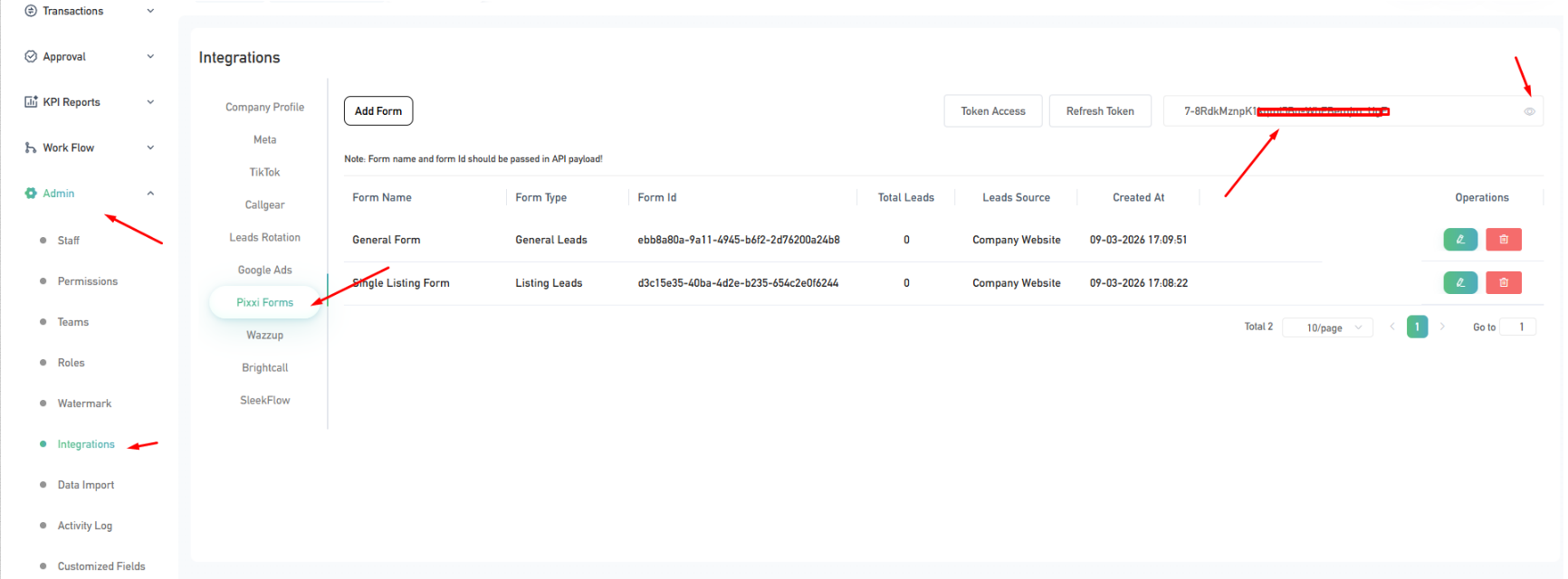
Public references point to the token living under CRM admin / integrations for Pixxi’s own products (e.g. Integrations and tools like Pixxi Forms). Typical flow:
- Log in to Pixxi CRM as an admin (or a role that can manage integrations / API access).
- Open Admin (or Settings) and look for Integrations (or API / Developer).
- Find the section related to the Data API or Pixxi Forms / external integrations—that’s where many tenants are shown a token (sometimes labeled API token, X-PIXXI-TOKEN, or similar).
- Copy the token and paste it into your WordPress plugin field API Token (the importer labels it that way in
class-pixxi-dashboard.php).
If you don’t see any token:
- Your plan or role may not include API access—ask Pixxi support or your account manager to enable it or to issue a token.
Where the endpoint URL comes from
The host and path (dataapi.pixxicrm.ae + /pixxiapi/v1/properties/...) are defined by Pixxi’s Data API. The variable part is the company path segment after /properties/.
You usually build the full URL like this:
- Start from the documented base, e.g.
https://dataapi.pixxicrm.ae/pixxiapi/v1/properties/ - Append your company name exactly as required (with URL encoding for spaces and special characters).
- Paste that entire string into API Endpoint URL in the plugin, which expects a “full URL including company endpoint” (see the hint next to the field in
class-pixxi-dashboard.php).
Technical reference: Pixxi publishes API documentation (e.g. ReDoc style docs at api-docs.pixxicrm.com) where you can confirm the path, headers, and body for the properties endpoint.
Quick checklist for the WordPress Pixxi Automatic Property Importer
Security
- Treat the token like a password: don’t commit it to git, don’t share it in tickets or screenshots without redacting.
- If it leaks, rotate it in Pixxi CRM and update the plugin.
Note: Menu names (Admin → Integrations → …) can change with CRM updates. If anything doesn’t match your screen, use Pixxi support or api-docs.pixxicrm.com as the source of truth. I don’t have access to your Pixxi tenant, so the exact menu for your account is the only definitive answer.
If you want this turned into a help doc inside the plugin or a published blog post, switch to Agent mode and say where you want it saved.